
I’m Japanese, and I occasionally introduce Japanese language and culture on YouTube.
This time, as part of that, I’ve created a Japanese-learning resource specifically for English speakers, so I’d like to introduce it to you.
Have you heard of the ANKI app?
ANKI is a world-famous app that helps you efficiently memorize vocabulary and other learning materials.
One of its key features is its spaced-repetition system. Based on the concept of the forgetting curve, ANKI brings review cards back at the right time—around when you are likely to start forgetting them—making it easier to retain what you’ve learned.
I’ll explain how to install the ANKI app later, but what I’ve created this time is the actual content used inside the ANKI app, called a “deck.”
I’m giving away this deck for free here, so if you’re interested, give it a try!
What Makes This Deck Special
This deck contains a large collection of casual expressions and frequently used slang that Japanese people actually use in everyday life.
Of course, the Japanese you find in textbooks is important too. However, the language people actually use in everyday conversation can be a little different.
In other words, even after studying Japanese from textbooks, there are still many unfamiliar and mysterious expressions that Japanese people use in real conversations.
But on the other hand, if you become able to understand and use the expressions in this deck, you’ll be able to understand what native Japanese speakers are saying more easily, and your own Japanese will also start to sound more natural and native-like.
For now, let me show you what the deck looks like when you use it in the app.
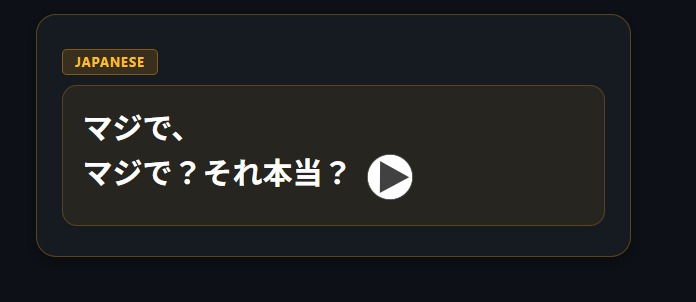
This is the front of the card.
As soon as the card appears on the screen, Japanese audio also starts playing.
The word I want you to remember here is 「マジで」, which is displayed on the first line.
The second line is an example sentence.
This is one of the most commonly used expressions by Japanese people. If you walk around Japan, you might hear it at least once a day.
So, what does it actually mean…?
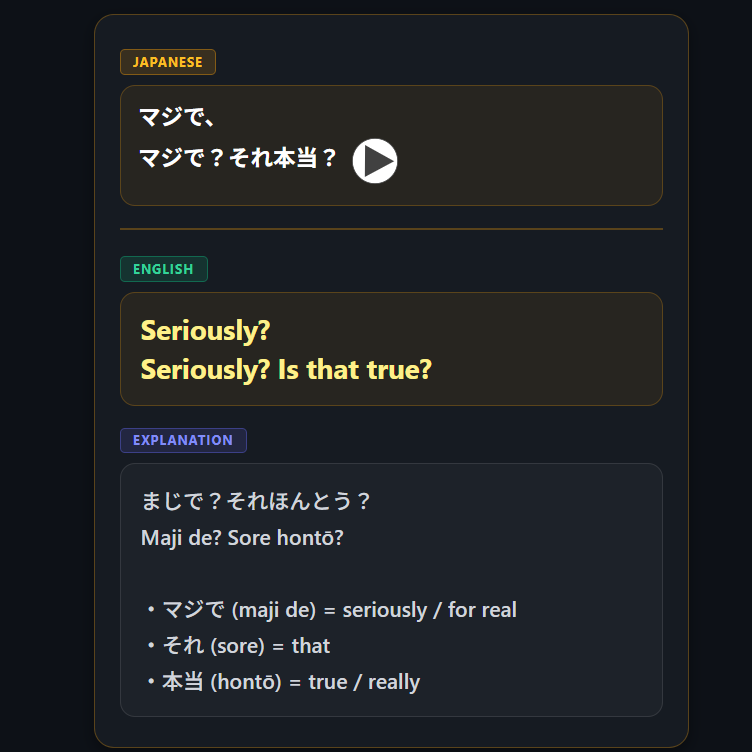
This is the back of the card.
Here, you’ll find the English translation, along with translations of some of the words used in the example sentence.
I’m giving away 45 cards like this for free, each featuring a word and an example sentence.
(The full version with 453 cards is available as a paid version.)
I’m sure these cards will help you improve your Japanese.
Finally, I’ve included the download link for this free ANKI deck, along with instructions on how to use it.
By the way, my website mainly features comedy content for Japanese readers.
Once you’ve learned some Japanese, be sure to check out my other articles as well!
Download
Download the free ANKI deck (45 cards) here:
The full ANKI deck (453 cards) is available for purchase on Gumroad.
(Price: $5)
How to Use
1. Download the Anki Deck File
Download the .apkg file using the button (link) below. 👇
(This is the same free ANKI deck with 50 cards that I mentioned earlier.)
2. How to Import the Deck by OS
Follow the instructions below according to the device you are using.
【PC (Windows / Mac)】※The easiest option
- Install the free Anki software from the official website: https://apps.ankiweb.net/
- Double-click the
.apkgfile you downloaded above. - Anki will launch automatically. Once you see a message saying that the import has been completed, you’re all set.
【iPhone / iPad】
- Install AnkiMobile Flashcards from the App Store. (This is the official paid app.)
※If you want to use Anki for free, you can also access AnkiWeb through your browser. - Download the file above using Safari or another browser.
- In the Files app, press and hold the downloaded
.apkgfile (or tap the Share button), then select “Open in Anki.”
【Android】
- Install AnkiDroid, a free Anki-compatible app, from the Google Play Store.
- Download the file above.
- Open AnkiDroid, tap ︙ (Menu) in the top-right corner → “Import”, and select the downloaded file.
3. Recommended Initial Settings & Study Tips
- Cards per day: Starting with a manageable pace of around 10–20 cards per day is a good way to keep studying consistently.
- Make use of the explanations: The “Explanation” field contains basic concepts and reasons behind the answers. Rather than simply checking whether your answer is correct or incorrect, take a moment to read the explanation. This can help you move beyond simple memorization.

コメント